
Imagine a plant manager watching the same station stop three times in one shift. Each stop seems minor, but by Friday the line has lost hours of output. A batch is under review for cosmetic defects, and maintenance is investigating a possible bearing problem. The team wants to use AI, but needs a practical place to start.
Learning how to enable AI in a production line starts with a measurable operational problem. Useful models depend on representative data, reliable integration and a team that can act on their outputs. A successful pilot must demonstrate value under normal production conditions before it is expanded.
This guide walks through that path in order: how to choose the first use case, what data and hardware you need, how to connect to PLCs and SCADA safely, how to test in shadow mode, and how to measure and scale the result. You do not need a data science team to follow it. You do need one clear problem and a willingness to measure before you build.
To enable AI in a production line, choose one measurable loss, assess the available data, connect an appropriately secured edge or server system, and validate the model in shadow mode. Introduce alerts or inspection actions only after testing, with defined human oversight, fallback procedures and independent machine safety functions.
Start with one station, one accountable owner and a small set of success measures. Compare AI with simpler alternatives before buying a platform.
What AI enablement means on a production line
AI enablement adds models that recognize patterns in production data to an existing system of PLCs, sensors, operators and plant software. A model may flag a defect, detect unusual machine behavior or recommend a setting. Its permitted actions must be defined separately from its predictive capabilities.
Three layers make that possible:
- Sense. Cameras, vibration, temperature, current or process sensors capture what the line is doing.
- Connect. A gateway or industrial computer collects data through supported interfaces such as OPC UA. MQTT can distribute messages through a configured broker; legacy equipment may need additional gateways or independent sensors.
- Decide. A tested model produces an inspection result, anomaly score or recommendation. A person or engineered control interface handles the response within defined limits.
Example: A bottling line already has a PLC counting fills and a camera checking caps. Enabling AI means feeding the camera images to an edge model trained on good and bad caps, so it can recognize defects the old rule-based tool misses, and sending its verdict to the PLC as a simple reject signal.
For a broader overview, see AI for machines and hardware. For PCB and assembly applications, see AI in electronics manufacturing.
Traditional vs AI-enabled line
| Area | Traditional line | AI-enabled line |
| Inspection | Manual checks or fixed-threshold vision | Models flag visual patterns within a validated inspection scope |
| Maintenance | Fix after failure or by calendar | Anomaly alerts support maintenance investigation |
| Process tuning | Operators adjust from experience | Models recommend setpoints from live data, inside PLC limits |
| Planning | Weekly plan with manual patches | Validated recommendations support replanning |
| Know-how | In a few experienced heads | Captured in data, alerts and operator copilots |
Why enable AI in a production line
Plants enable AI because some losses are too frequent, too subtle or too fast for people to catch. A stoppage that costs thousands of dollars an hour, a defect that only shows under certain lighting, or a vibration pattern that precedes a bearing failure by days are all data problems before they are labor problems.
The case is strongest when three things are true: the problem repeats, it costs real money, and the line already produces data about it.
Expert tip: Ask your maintenance and quality leads for their top three recurring losses by cost. If one of them already leaves a trace in sensor or image data, you have a candidate use case.
Benefits
| Benefit | How AI delivers it | What to measure |
| Fewer defects reaching customers | Models flag visible defects within validated coverage | Defect escape rate, first-pass yield |
| Less unplanned downtime | Anomaly alerts prompt investigation | Unplanned downtime hours, MTBF |
| Lower maintenance cost | Repairs move from emergency to planned | Maintenance cost per unit |
| Higher OEE | Fewer stops, fewer rejects, tuned speeds | OEE by shift |
| Labor reallocated | Staff move from repetitive checking to exceptions | Inspection hours |
| Faster learning | Decision records support review and learning | Time to root cause |
Potential benefits include fewer defect escapes, earlier investigation of abnormal equipment behavior and less repetitive inspection work. None is guaranteed. Measure the existing loss and compare the deployed system with that baseline, accounting for product mix, operating hours and other process changes.
Warning: Vendor-commissioned ROI studies and blog benchmarks often overstate typical results. Use them to frame questions, not to build your business case.
Where AI can be implemented on a production line
Potential starting points include visual inspection, machine condition monitoring, process recommendations, scheduling and operator information support. Their suitability depends on the process, available data and consequences of an incorrect output.
| Use case | Typical data | Main risk |
| AI visual inspection | Images or video from industrial cameras | Lighting and part variation; too few labeled defects |
| Predictive maintenance | Vibration, temperature, current, pressure, run hours | Too few failure examples; alert fatigue |
| Process optimization | PLC and process tags, recipe and quality results | Cause and effect are tangled; control actions need strict limits |
| Production scheduling | MES, ERP, line status, orders | Poor master data |
| Operator copilots | Manuals, SOPs, work orders, alarms | Wrong answers; must stay advisory |
Example: A plastics molder fights short shots and flash. Its process data is already logged and finished parts are inspected. This points to process optimization plus vision inspection, not predictive maintenance, because the pain sits in quality, not breakdowns.
How to pick the first use case
Score each candidate on five questions and start with the highest total:
- Does the problem cost real money every month?
- Does the line already produce, or can it cheaply produce, the data needed?
- Can you measure a baseline today?
- Can the AI start by advising, not controlling?
- Is there one owner who wants the result?
Common mistake: Choosing the use case a vendor is selling. Choose the loss you can measure, then find the tool that fits.
Who is involved
| Department | Role in AI enablement |
| Operations / production | Owns the problem, the KPI and the go-live decision |
| Quality | Defines defects, supplies labeled examples, signs off accuracy |
| Maintenance and reliability | Supplies failure history; acts on predictions |
| Manufacturing / controls engineering | Connects PLCs, designs signals, protects safety logic |
| IT | Networks, identity, storage, support for edge servers |
| OT security | Zones and conduits, access control, patching plan |
| EHS | Reviews any effect on machine safety |
| Finance | Validates the baseline and payback |
| Training / HR | Prepares operators and changes roles |
Step-by-step roadmap to enable AI in a production line
Use the following six phases as a practical rollout sequence. Four formal approval gates follow problem definition, integration, shadow testing and live validation. Data readiness is also reviewed before integration begins.
Phase 1 Frame the problem
Pick one use case on one station. Write down the loss in money and units, such as scrap per shift, minutes of unplanned downtime per week or inspection hours. Capture the baseline for at least a few representative weeks, and agree the success criteria with operations and finance before anyone buys hardware.
Gate: The business case and baseline are signed off by the line owner and finance.
Example: “Reduce cosmetic defects reaching final pack on Line 2” is a use case. “Adopt AI” is not.
Phase 2 Check data and line readiness
Find out what data exists and whether it is usable. For vision, collect sample images across shifts, product variants and lighting, including real defects. For machine health, check which sensors already exist and whether the PLC logs the signals you need. Confirm there is a place to mount a camera or sensor without disturbing operators or guarding.
If failures are rare, anomaly detection can help identify departures from normal operation. An anomaly is not a confirmed fault or a reliable remaining-life estimate. Validate alerts against operating conditions and maintenance findings before using them to schedule work.

A sensor can add condition data to existing equipment. AI-generated illustration.
Common mistake: Pilot data that is too clean. A model trained on a single good week often fails when materials, lighting or operators change.
Phase 3 Connect and secure
Install the edge hardware and connect it to the line in a read-only way first. Old machines usually do not need replacing. Typical retrofit patterns are:
- Read PLC tags through an OPC UA server or a protocol gateway.
- Add clip-on vibration, temperature or current sensors beside the existing control system.
- Mount a smart camera or a camera plus edge computer at the inspection point.
- Return approved outputs through a documented interface, such as a broker message, an application API or an engineered PLC input. Test timing, product tracking and failure behavior before enabling automatic rejection.
Separate the AI system from other network zones according to the plant risk assessment. Limit communication paths, authenticate users and devices, control remote access, and maintain recoverable configurations. Preserve validated emergency stops, interlocks and safety controls independently of an ordinary AI model; these may use safety relays or safety PLCs.
Gate: Network, safety and security reviews pass, with controls engineering and EHS signing off.
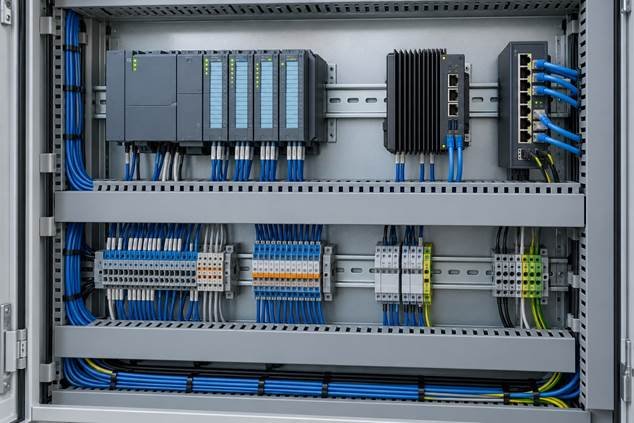
Edge computing can sit alongside existing automation through reviewed interfaces. AI-generated illustration.
Phase 4 Pilot in shadow mode
Run the model on live data while operators work as usual. The model makes calls, but nothing acts on them. Compare its output with what operators and quality checks actually decided, and record where they differ.
Evaluate false rejects and missed defects by defect class, shift and product variant. Use independently reviewed ground truth rather than assuming an operator or the model is always right. Keep validation data separate from training data, including production runs or batches that the model has not seen.
Record operator disagreements and their reasons. Frequent disagreement can reveal model errors, unclear defect definitions or workflow problems; it is not a direct measure of accuracy.
Gate: Shadow-mode results meet the success criteria you set in Phase 1.

Shadow testing compares model outputs with independently reviewed inspection results. AI-generated illustration.
Phase 5 Go live with human oversight
Enable alerts or inspection actions only within the approved scope, with traceable decisions and a tested fallback. For automatic rejection, verify part identification, conveyor timing and behavior when inference is late or unavailable. Any setpoint recommendation needs engineering review and enforced operating limits; a normal PLC limit does not by itself establish functional safety.
Gate: KPIs hold on the live line over a period the line owner finds convincing.
Phase 6 Scale and operate
Treat the model like maintained production equipment. Monitor performance, data quality and drift, version models and thresholds, and define triggers for review or retraining. Validate each replacement before deployment. Reuse the architecture on similar lines, but recheck local products, lighting, timing and economics.
Example: A packaging inspection design may be reused on a sister line after checking local products, lighting, image quality, control interfaces and acceptance results.
Roadmap at a glance
| Phase | Key output | Owner | Gate question |
| 1. Frame | Use case, baseline, success criteria | Line owner, finance | Is the loss worth solving and measurable? |
| 2. Readiness | Data and site assessment | Engineering, quality | Do we have usable data and access? |
| 3. Connect | Edge system, secure link | Controls, IT, OT security | Is it safe and secure? |
| 4. Shadow pilot | Accuracy and override results | Quality, operators | Does it meet the criteria? |
| 5. Go live | Oversight process, rollback plan | Operations | Do KPIs hold? |
| 6. Scale | MLOps routine, replication plan | Operations, IT | Can the next line start faster? |
AI technologies used on a production line
You do not need every technology below. Most first projects use two or three.
| Technology | What it does | Business function |
| Computer vision (CNNs, vision transformers) | Detects defects, checks assembly, reads codes | Quality |
| Anomaly detection | Learns normal machine behavior and flags departures | Maintenance |
| Time-series forecasting | Forecasts future values; failure prediction needs suitable labels and validation | Maintenance, planning |
| Optimization and reinforcement learning | Recommends process settings or schedules | Production, planning |
| Edge AI | Runs models next to the line for low latency | All line-speed uses |
| OPC UA and MQTT | Move machine data in a vendor-neutral way | IT/OT integration |
| MLOps | Versions, monitors and retrains models | Operations, IT |
| Digital twins | Simulate changes before touching the line | Engineering |
| Large language models | Answer questions from manuals and work orders | Support, maintenance |
Edge, cloud or hybrid
| Factor | Edge | Cloud | Hybrid |
| Latency | Lowest; suits line-speed inspection | Higher; network dependent | Edge for inference, cloud for training |
| Connectivity | Works if the link drops | Needs a reliable link | Edge keeps running offline |
| Security | Requires local security controls | Requires secure data transfer and service controls | Controlled conduits only |
| Scale across sites | Needs fleet management | Easier central management | Common choice for multi-site plants |
| Cost model | Upfront hardware | Usage-based | Both |
Edge inference can reduce network dependency for time-sensitive inspection. It does not automatically provide deterministic timing or functional safety. Measure end-to-end latency, test outages and define a fallback; use an on-premises server or cloud service for training and management where appropriate.
Tools to evaluate for production line AI
Match the tool category to the task and the skills available to support it. Cognex In-Sight 2800 combines rule-based and learning-based vision tools for inspection tasks. NVIDIA DeepStream provides a development platform for video analytics. These are examples to evaluate against your own acceptance tests, not a ranked shortlist.
Before procurement, verify the current product lifecycle, supported hardware, licensing, security maintenance, data ownership and export options directly with the supplier. Plan how production will continue if support ends.
Expert tip: Insist on exportable models, documented interfaces and a written exit plan when you sign with any AI vendor.
Implementation process timeline, cost and KPIs
Timeline
For preliminary planning, allow several months for a first integrated use case. The phase estimates below are illustrative allowances, not research benchmarks or delivery commitments. Data collection, shutdown windows and validation may take substantially longer; a limited advisory pilot may be faster.
| Phase | Typical duration |
| 1. Frame the problem | 2–4 weeks |
| 2. Data and line readiness | 4–8 weeks |
| 3. Connect and secure | 4–8 weeks |
| 4. Shadow-mode pilot | 4–8 weeks |
| 5. Go live | 2–4 weeks |
| First use case in production | About 4–8 months |
| 6. Scale and operate | Ongoing |
What drives cost
Exact prices vary too much by vendor, region and scope to quote responsibly. Ask for quotes against these cost drivers instead:
| Cost driver | What affects it | How to keep it under control |
| Sensors and cameras | Number of stations, optics, lighting, enclosures | Start with one station |
| Edge hardware | GPU or NPU needs, ruggedization | Size for the pilot model, not future wishes |
| Software and licenses | Per-camera, per-asset or subscription pricing | Compare total cost over three years |
| Integration | PLC, MES, historian and network work | Use OPC UA and standard interfaces |
| Data labeling | Defect types, image volume | Plan labeling as an ongoing task |
| Security and compliance | Zones, access, audit | Design in at Phase 3, not after |
| People and training | Operator time, supplier support | Involve operators early |
Estimate annual net benefit as avoided scrap, downtime and other verified costs minus recurring software, support, data and operating costs. Avoid double counting overlapping benefits. Simple payback equals the one-time project investment divided by positive annual net benefit. Test a lower-benefit scenario and include the cost of false rejects and missed defects.
Key takeaway: A project that only pays back at the vendor’s best-case benefit is not ready.
KPIs to track
| KPI | What it shows | Set a baseline |
| OEE (availability × performance × quality) | Overall line effectiveness | Before Phase 1 ends |
| First-pass yield and scrap rate | Quality gain | Before Phase 1 ends |
| Defect escape rate | Defects missed at the defined inspection boundary | Before Phase 1 ends |
| False reject and false accept rate | Trust in the inspection model | Against labeled ground truth |
| Unplanned downtime, MTBF, MTTR | Maintenance reliability and repair duration | Before Phase 1 ends |
| Operator override rate | Human disagreement and workflow fit | During shadow mode |
| Inference latency and model uptime | Fit for line speed | During pilot |
| Time to retrain and redeploy | Operating maturity | After go-live |
| Payback period | Business case | Estimate in Phase 1 |
Pro tip: Review KPIs weekly during shadow mode and monthly after go-live, with operations, quality and maintenance in the same room.
Common challenges and how to solve them
Common obstacles include unrepresentative data, underestimated integration work, unclear ownership and poor fit with operator routines. Resolve these before expanding the pilot. If a fixed rule, improved lighting or a conventional maintenance intervention solves the problem more reliably, use that approach.
| Challenge | Why it happens | Solution |
| Unrepresentative pilot data | A pilot looks strong on exceptional data and fails on normal variation | Collect across shifts, SKUs and lighting; run a readiness check before building |
| Underestimated IT/OT integration | ERP, connectivity and data pipelines are rarely budgeted | Budget integration explicitly; use OPC UA and standard interfaces |
| Cyber exposure | AI traffic can cross OT zone boundaries | Edge inference, zones and conduits per ISA/IEC 62443, audited access |
| Safety concerns | An AI function must not become an unvalidated safety function | Preserve validated safety controls; assess each AI interface |
| Model drift | New materials, wear and lighting change the data | Drift monitoring, scheduled retraining, rollback plan |
| Operator distrust | Black-box alarms get ignored or bypassed | Shadow mode, override buttons, operators involved from week one |
| No owner after the pilot | Pilots that depend on one champion stall | Name a business owner and a scale budget before the pilot |
| Vendor lock-in or product retirement | Services get discontinued | Open interfaces, exportable models, written exit plan |
Deployment begins an ongoing maintenance responsibility. Monitor performance and review changing products, materials and operating conditions.
Security and compliance
The joint Principles for the Secure Integration of AI in OT guidance emphasizes understanding AI risks, assessing whether AI fits the operational need, establishing governance and assurance, and embedding safety and security. Apply those principles through documented responsibilities, testing, monitoring and incident response. The NIST AI Risk Management Framework provides a complementary voluntary structure for governing and evaluating AI risk.
For deployments subject to EU rules, classify the specific system and intended purpose using the European Commission AI Act guidance and the applicable legal text. Industrial use alone does not determine high-risk status, and machinery obligations may also apply. Verify the rules and application dates for the actual deployment before approval rather than relying on a general implementation guide.
Warning: AI should not be part of a safety function unless it has been designed and validated as one under the applicable machine safety standards.
Best practices
- Start narrow. One station, one KPI, one owner.
- Baseline first. If you cannot measure today’s loss, you cannot prove a gain.
- Shadow mode before action. Earn trust with evidence.
- Preserve validated control and safety functions. Review every interface that lets AI influence equipment.
- Log every AI decision. You need an audit trail for quality, safety and retraining.
- Treat labeling as an operation. Define defect classes with quality and keep adding examples.
- Version everything. Models, data sets, thresholds and the software around them.
- Plan for retirement. Know how to run the old method if the AI is switched off.
- Train operators on what the system sees. People use what they understand.
Illustrative production scenarios
The following scenarios are illustrative applications of the roadmap, not reports of measured customer results.
- Small machining shop. The loss is unplanned stops on one CNC center. The shop adds a vibration and current sensor to the spindle, learns normal behavior in shadow mode, and begins with alerts to the maintenance lead before touching any schedule.
- Food packaging line. The loss is mislabeled or damaged packs. A smart camera with embedded AI checks each pack at the station, sends a reject signal to the PLC, and logs every image so quality can review disputes.
Future trends
- Agentic replanning. Software agents that watch line status and rework schedules in real time, with people approving the changes.
- Vision foundation models at the edge. Pretrained vision models fine-tuned for a factory, reducing how many defect images you must collect.
- Operator assistants can help retrieve approved manuals and procedures. Require source references and human review, particularly for troubleshooting or maintenance advice.
- Hybrid architectures can combine local inference with central model management. Test whether the entire local workflow, including licensing and dependencies, continues during an outage.
- Governance is becoming part of procurement: ask how suppliers test models, report changes, protect data and support incident investigation.
- Regulatory review should remain part of change control as the intended use, deployment region or applicable requirements change.
Implementation checklist
Quick checklist: Tick each item before moving to the next gate.
- Business: one use case with a named owner and a measured baseline
- Business: success criteria and payback logic agreed with finance
- Data: representative data across shifts, products and lighting
- Data: labeling plan and agreed defect or failure definitions
- Equipment: mounting, power and lighting plan for sensors or cameras
- Network: edge system in its own OT zone with controlled conduits
- Safety: validated safety functions remain independent of ordinary AI outputs
- Security: access control, logging and patching plan
- Pilot: shadow-mode plan with ground truth and override tracking
- People: operators trained and feedback route defined
- Operations: rollback plan and fallback method documented
- Scale: retraining, monitoring and ownership defined
Frequently asked questions
What is shadow mode and why use it
The model runs on live data but takes no operational action. Compare its outputs with independently reviewed results before approving a live deployment.
How many defect images are enough
There is no universal number of defect images. Requirements depend on defect diversity, imaging conditions and the model. Use held-out production data and defect-specific acceptance criteria to decide whether coverage is sufficient; a small sample cannot establish a very low escape rate.
What if my line has very few failures to learn from
Consider anomaly detection or a suitable pretrained model, but verify alerts against real maintenance findings. A model trained on normal data can flag unusual behavior without identifying its cause.
Can I run AI without internet access
Yes. Edge systems can run inference locally, and training can be done on-premises or when a link is available.
Who should own the AI project
The line or operations owner who holds the KPI, with controls, IT, quality and OT security supporting.
How do I keep the AI from affecting safety
Preserve validated safety functions independently of ordinary AI outputs, restrict permitted actions and review control interfaces with qualified controls and safety specialists. Edge execution and human override alone do not establish safety.
How often should models be retrained
When monitoring shows drift or when products, materials or conditions change. Set a review schedule instead of waiting for failures.
What is the difference between machine vision and AI vision
Traditional machine vision uses explicitly configured rules and measurements. AI vision learns patterns from examples. Either may be the better choice for a particular defect, and many systems combine them; AI does not automatically generalize to unseen conditions.
What is OPC UA and why does it matter
OPC UA is a platform-independent industrial interoperability framework that includes data modeling, services and security capabilities. The source equipment must expose a compatible server or gateway, and certificates, permissions and network access still need configuration.
Should I build or buy
Buy packaged tools for common problems such as standard inspections or rotating-equipment health. Build or integrate custom models only where your process is unusual.
How do I get operators to trust the system
Involve them from the start, show why the model flags something, provide an override and feed their corrections back into training.
What happens if the AI vendor discontinues a product
Maintain a supported fallback and confirm data export, model portability where available, interfaces and exit terms before purchase. Do not assume a proprietary model can be moved to another platform.
Conclusion
To enable AI in a production line, choose a measurable loss, confirm that the data can support the task, connect through reviewed interfaces and test in shadow mode. Introduce operational actions only after the model and its surrounding workflow meet agreed acceptance criteria.
Start with a narrow scope and maintain the system after launch. Scale when measured results justify the next investment, carrying forward the validation methods and lessons from the first line.
Action plan your first 90 days
| Window | Actions | Output |
| Days 1–30 | List top recurring losses by cost; score use cases; capture baselines; name an owner; assess data and site | Chosen use case, baseline, success criteria |
| Days 31–60 | Review OT network and safety scope; shortlist two or three tools; request quotes against the cost drivers; collect representative data | Approved design, selected vendor or build plan |
| Days 61–90 | Install edge hardware read-only; connect data; start shadow mode; review disagreements weekly with operators | First shadow-mode results and a go/no-go view |
The first ninety days should establish whether the use case merits further investment. Treat this schedule as a planning example, not a deadline for production deployment.